How-to configure a Huawei phone
There are different options, some Android specific, some Huawei specific:
- Add AAPS and xdrip+ to apps list which ignore battery optimisations:
-
Settings / App / Settings / Special autorisations / Ignore battery optimisation / Select "All applications" / Set app to allowed
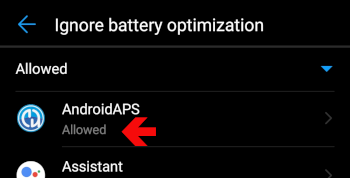
-
Set battery option settings:
- Settings / App / Select AndroidAPS/xdrip+ / Under Battery / App launch
-
Make sure to remove "automatic management"
- Allow:
- Automatic launch
- Secondary launch (can be launched from other apps)
- Background run
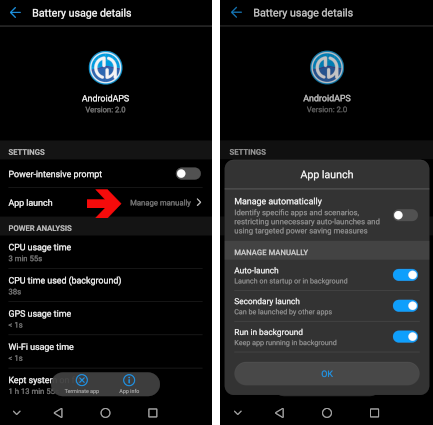
-
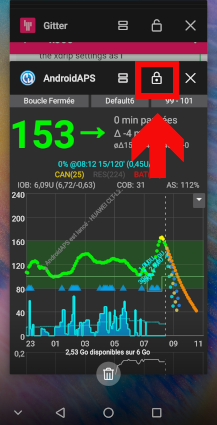
Lock App
-
Go into App recent list and select the lock icon
For xdrip+, you can also enable persistent notifications (within xdrip+ app): * Setttings / less common settings / other misc options / Run Collector in foreground
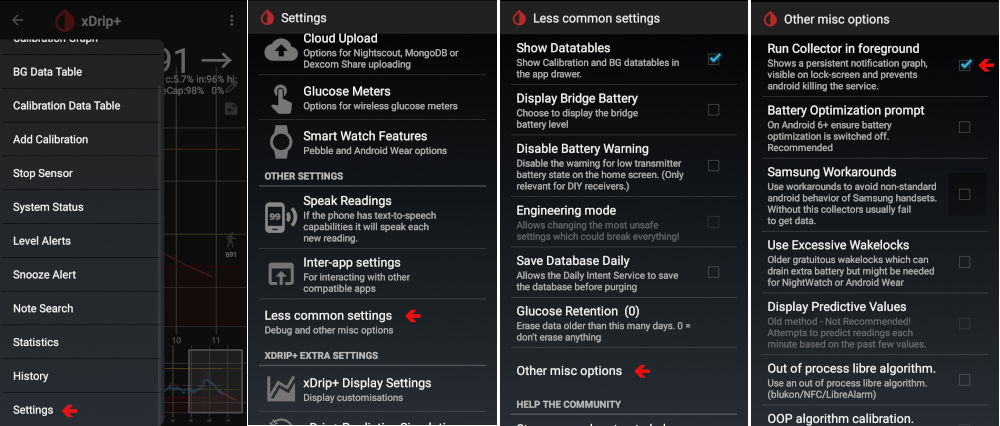
Depending on Android version, these settings are somewhere else. These explanations are for Android 8.1.